--== READ ME ==--.txt
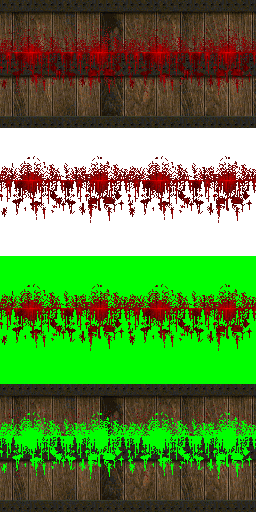
This script was designed to help me create patch textures of pure gore, that I could overlay on other textures in the patch editor or in Affinity. I can be used for more than that though.

It was designed to lift off blood, but was expanded to work on any colour

It has a number of ways to lift the blood colours from a texture and save into a PNG file with all the other colours as transparent.

You can also save the composite texture, as in all the other colours in the texture, with the chosen colours transparent.

========

BLOODSPLIT v2.4
Lift blood / gore pixels off Doom textures onto transparent
truecolour PNGs. Scans a directory tree; writes results into a
mirrored structure under _BloodSplit, same filenames, always
RGBA PNG. Files with no blood are not written at all.

MODES  (pick one; --doomMode is the default)
  --doomMode [INDICES...]
      exact match against the embedded Doom2 PLAYPAL -- no palette
      file ever needed. Default set: the red ramp (176-191), which
      is pure blood only. Widen with --wide or --allred, or take
      full control by listing indices yourself (same syntax as
      --paletteMode; overrides --wide/--allred):
          bloodsplit --doomMode 16-47, 176-191, 66
  -w, --wide
      doomMode: add dried-blood/flesh reds and bright blood
      highlights (indices 28-47, 173-175). ~39 colours.
  -allred, --allred
      doomMode: every blood-relevant colour in the Doom2 palette --
      indices 16-47, 169-191, 232-235 (59 indices). Adds the pale
      flesh-reds, pink highlights and dark scorched oranges that
      --wide leaves behind. Catches the most gore; expect false
      hits on flesh, fire and torch pixels. Supersedes --wide.
  --paletteMode FILE INDICES...
      exact match against the palette entries YOU list, from a
      supplied palette file. Indices are singles and/or ranges,
      comma or space separated: 124-138, 15, 10, 20-30
      Duplicates and overlapping ranges are simply combined.
      FILE formats: WAD (PLAYPAL found inside), raw .pal/lump,
      JASC .pal, DoomTools playpal PNG (256 wide), SLADE pal0.png.
  --colourMode [COLOURS...]
      hue-family matching, no palette involved -- for truecolour
      images or big-palette games (Hexen etc). Lifts every shade
      of each base colour, bright to dark, ignoring other hues.
      COLOURS: hex (no # needed) and/or names, one or several,
      comma or space separated. A pixel matching ANY base is
      lifted. Default: blood red.
      Names: blue, brown, cyan, green, lime, magenta, orange, pink, purple, red, teal, violet, yellow

INPUT / OUTPUT
  -i, --input DIR
      directory to scan (recursive). Default: current directory.
  -o, --output DIR
      where the _BloodSplit dir is created. Default: current directory.
  --ext png,bmp,...
      image extensions to process. Default: png,bmp,gif,tga,jpg,jpeg.

TUNING
  --tolerance N
      colourMode master knob 0-100, default 25. Higher = wider hue
      window and looser saturation floor, applied to every base
      colour. Start here before touching the two overrides below.
  --hue-tol X
      colourMode override: hue window in degrees either side of each
      base colour. (Default derives from --tolerance; 25 -> 14.)
  --sat-min X
      colourMode override: minimum saturation 0-1.
      (Default derives from --tolerance; 25 -> 0.55.)
  --softAlpha N
      0-100 feather amount, default 0 (hard mask).
      colourMode: borderline pixels fade in over an N%-wide band.
      doom/paletteMode: blob edges are feathered by neighbourhood.
  --saveCompositeFile
      for every blood file written, also save NAME--composite.png:
      the original image with the blood punched out to transparency.
      With --softAlpha the composite gets the exact alpha complement,
      so layering composite over blood rebuilds the original.
      Saved next to the blood file, easy to eyeball-check.
  --saveCompositeFileMoved
      same, but composites go straight into
      _BloodSplit\__CompositeFiles\... instead of next to the blood
      files -- identical layout to running --moveComposite afterwards.
  --moveComposite
      standalone tidy-up, no image processing: move every file ending
      --composite.png found under -i (subdirs included, _BloodSplit
      trees included) into __CompositeFiles at -o, mirroring the
      directory structure. Never looks inside __CompositeFiles, so
      re-runs are safe; existing destination files are not overwritten.
  --min-blob N
      drop connected blood blobs smaller than N pixels. Default 3.
  --min-pixels N
      skip the file entirely if fewer than N blood pixels survive.
      Default 8.

NOTES
      - Mode and option names are matched case-insensitively.
      - Existing transparency is preserved; transparent pixels are never blood.
      - _BloodSplit directories are never scanned, so re-runs are safe.
      - In doom/paletteMode, bloodless files that don't look palette-clean
        trigger an end-of-run note suggesting --colourMode.

EXAMPLES
  bloodsplit
      scan current dir, doomMode red ramp, output to .\_BloodSplit
  bloodsplit --allred
      the widest doomMode net -- all 59 blood-relevant Doom2 indices
  bloodsplit -i D:\tex\walls -o D:\out --wide
      doomMode middle tier, output to D:\out\_BloodSplit
  bloodsplit --doomMode 16-47, 169-191
      explicit indices against the embedded Doom2 palette --
      (--allred minus the 232-235 oranges, for example)
  bloodsplit --paletteMode mypal.wad 124-138, 15, 10, 20-30
      lift exactly those palette indices, palette pulled from the WAD
  bloodsplit --colourMode
      hue matching, default blood red -- for truecolour/Hexen images
  bloodsplit --colourMode FF3700, FF000B, FF0058
      several base colours at once; a pixel matching any is lifted
  bloodsplit --colourMode green --tolerance 40
      every shade of green (nukage?) with a looser match
  bloodsplit --allred --saveCompositeFile
      widest net, plus a --composite copy of each hit with the blood
      punched out, saved next to the blood file
  bloodsplit --allred --saveCompositeFileMoved
      same, but composites land in _BloodSplit\__CompositeFiles\...
  cd _BloodSplit && bloodsplit --moveComposite
      after eyeball-checking: sweep the --composite.png files out of
      the tree into _BloodSplit\__CompositeFiles, structure mirrored
  bloodsplit --colourMode red 00FF88 --softAlpha 30
      names and hex mix freely; soft edges