/public/Tools/Python Scripts/intertextAlignment/
| Name | Type | Size | Date |
|---|---|---|---|
| ../ | Directory | — | — |
| --== READ ME ==-- | readme | 2kb | 14-October-2026 |
| intertxt.bat | bat | 251b | 10-October-2026 |
| intertxt_script.py | py | 38kb | 09-October-2026 |
| result-example.Input.txt | txt | 653b | 14-October-2026 |
| result-example.Intertex_umapinfo.txt | txt | 769b | 14-October-2026 |
--== READ ME ==--.txt
========================================================================
  INTERTEXT  -  UMAPINFO intertext formatter + screen preview
========================================================================

USAGE
  intertext <file.txt> [options]
  intertext -sizes [-wad file]

WHAT IT DOES
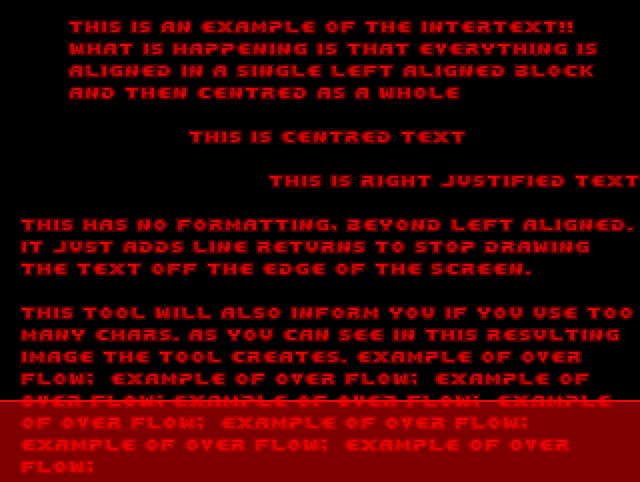
  Word-wraps your text to the exact pixel widths of the Doom font,
  applies alignment blocks, and writes:
    <name>_intertext.txt   the UMAPINFO intertext block
    <name>.png             preview of the text screen (always,
                           overwritten each run)
  Doom never wraps text itself, so every line is pre-broken to fit.

SOURCE FORMAT
  - Each line you type is a hard line break.
  - Lines wider than the screen are word-wrapped automatically.
  - Blank lines stay blank. Text is uppercased (the font has no
    lowercase).
  - Alignment blocks (may span any number of lines, no nesting):
      center{ ... }  center each line
      block{ ... }   keep lines left-aligned to each other,
                     center the block as a whole
      right{ ... }   right-align each line
      left{ ... }    explicit left (same as no block)
  - Use \{ \} \\ for literal braces / backslash.
  - Alignment uses 4px spaces, so centering is accurate to ~2px.

OPTIONS
  -wad <file>       PWAD/IWAD to take the font, PLAYPAL and -bg from. Any
                    lump it lacks falls back to DEFAULT_IWAD (top of script).
  -o <file>         write the intertext .txt here instead of <name>_intertext.txt
  -stdout           print the intertext block instead of writing the .txt
  -bg <name|png>    preview background: a flat or patch lump name (tiled
                    like the engine), or a .png file. Default: black.
  -scale <n>        preview scale 1-8 (default 2)
  -width <px>       wrap width (default 310; more than that is
                    cut off by vanilla-style engines)
  -report           print each line's y, x start/end, width and status
  -sizes            print the font width table and exit
  -h, --help        show this help

SCREEN LIMITS
  Text starts at x=10, y=10, 11px per line. About 17 lines fit
  on a 200px screen; overflowing lines are reported and shown in red
  below the cut-off in the preview PNG.

EXAMPLES
  intertext story.txt                     story_intertext.txt + story.png
  intertext story.txt -wad citadel.wad    use the PWAD's font
  intertext story.txt -bg SLIME16         preview over a tiled flat
  intertext story.txt -report             show per-line pixel positions
  intertext story.txt -stdout             print the block, no .txt written
  intertext -sizes                        dump the font metrics